Welcome to Gaia! ::


Pandilicious's Husbando

Invisible Member

39,510 Points
  • Citizen 200
  • Person of Interest 200
  • Winged 100
If you are having trouble with webjay giving you glitches, check their forums for help. I haven't used webjay since I made my screenshots, so I don't know anything that's going on with them.


Welcome to my guide to playing your own music in your profile via XSPF Players.

First off, what is an XSPF Player? Simply put, it's a flash music player that works off an XML playlist. All you need to do is upload your favorite music (or whatever music you'd want to play in your profile), and then load it into a playlist.

And loading your music into a playlist is even easier, thanks to a site called www.webjay.org that does all the work for you smile

Post 2: Loading your playlist via Webjay
Post 3: Creating your playlist yourself
Post 4: Getting your XSPF player
Post 5: Putting it all together in your profile
Post 6: Where to host your music
Post 7-10: Just in case xd

Pandilicious's Husbando

Invisible Member

39,510 Points
  • Citizen 200
  • Person of Interest 200
  • Winged 100
Making an XSPF Playlist using WebJay.org


The first step is to upload your music. If you have your own webspace that allows MP3 uploads, that's probably the best place to start.

Once you have your music uploaded, you can start generating your playlist.

Webjay is probably the easiest way to get up and running with your playlist.

Just go, sign up for an account, verify your email address, and you are ready to create a playlist and add songs to it.

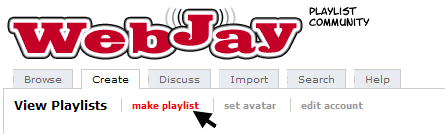
Once you've signed up and signed in, click on the "Make Playlist" link.
User Image

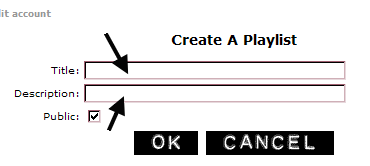
Click that and it will ask you to name your playlist, and give a short description. The name will end up being the filename, and the description will be the first thing the person sees when they load your XSPF player. I'd suggest avoiding characters like apostrophe's or anything like that in the title.

User Image

It also gives you the opportunity to decide if you want your playlist to be public or private. I'd suggest making it private due to the fact that if you are playing alot of copyrighted music and wbejay finds your list to be public, they'll make it private for you xd

Once you've created your playlist, it's time to start adding files to it.

By default, as soon as you create a playlist, it'll take you to where you can add a song.

The basic details it lets you edit are the song name as you want it to appear in your playlist, and the URL of the song itself.

linked to save from scrolling

If you click on advanced details, it will let you add an image and a website link. These are good if you are trying to advertise an indie band or something xd

Anyways, fill in the blanks with the name and URL at least and then hit submit.

A few seconds later, the song will be added to your playlist.

Once it's done, it takes you back to your playlist.

You can then add another song, add another song to the end of the playlist, or edit songs already in the playlist.

linked to save from scrolling

Pandilicious's Husbando

Invisible Member

39,510 Points
  • Citizen 200
  • Person of Interest 200
  • Winged 100
Building your own XSPF playlist

Alright, to start with, you'll need a program like notepad to work on your playlist.

Open it up and make a new file.

Then you'll start copying code in.

First, you need this code at the top of the page:
<?xml version="1.0" encoding="UTF-8"?>
<playlist version="0" >
<title>What Your Player Should Say Before People Start Playing Music</title>
<annotation>What Your Player Should Say Before People Start Playing Music</annotation>
<trackList>

Instead of "What Your Player Should Say Before People Start Playing Music" put... whatever you want it to say before people start playing music.

And then at the bottom you'll need this code:
</trackList>
</playlist>

Between the first trackList tag and the last trackList tag goes the actual playlist.

The format for a single song looks like this:
<track>
<location>http://www.example.com/folder/song.mp3</location>
<annotation>Name of Track</annotation>
</track>


The URL between the location tags is the URL of your mp3. The text between the annotation tags is the content that will show in the display and in the playlist.

And then you just use that code for as many songs as you need. The player's code will automatically number the songs for you so you don't need to include any of that information in the "Annotation"


Once you've finished editing, save the file as SOMETHING.xspf, where SOMETHING is whatever you want your filename to be. And then upload it to your host.

Pandilicious's Husbando

Invisible Member

39,510 Points
  • Citizen 200
  • Person of Interest 200
  • Winged 100
Getting the Player Files

Now, in all honesty, you could just use any player that is already out on the web, hosted by someone else, and just put your playlist URL into the multimedia URL.

But I like to discourage that sort of hotlinking.

So instead, I'll show you how to get the files yourself, so that you can upload them to your own host.

Basically, you choose which player you want to use, the button, the slim, or the extended.

The button version is simply a play button, with the ability to only play or pause the music. It's ZIP files can be found here: http://prdownloads.sourceforge.net/musicplayer/button_player-0.1.zip?download

The slim version has play/pause, skip, and stop buttons, as well as displaying track information. It's ZIP files can be found here: http://prdownloads.sourceforge.net/musicplayer/xspf_player_slim-0.2.3.zip?download

And finally the extended version has everything the slim version has, but it also shows the full playlist. It's ZIP files can be found here: http://prdownloads.sourceforge.net/musicplayer/xspf_player-0.2.3.zip?download

Once you've finished downloading the zip file, you'll need to unzip it. I'd reccommend unzipping it to a folder on your desktop just so that you don't lose track of it.

Then you'll need your own webhost to upload the files to. To the best of my knowledge you only need to upload the .swf file that is downloaded. For those of you who don't have your computer set up to show you the file extensions as part of it's name, this file is the one that says "Flash Movie" in the "Type" column. The other files are available if you are good with flash/action script and wanna tweak things, such as colors and whatnot.

Pandilicious's Husbando

Invisible Member

39,510 Points
  • Citizen 200
  • Person of Interest 200
  • Winged 100
Putting it all together
Now, you've got your playlist, either on WebJay.org. or on your own personal host.
Now it's time to put it in your profile.
There are two parts to the URL. The first is the location of the flash player, and the second is the location of the playlist.

It's formatted as such:

http://url of flash player file?playlist_url=url of playlist file

Replace the bold parts with your URLs.

(Your playlist URL if you use WebJay.org can be found by clicking the create tab, then clicking on your playlists title. Take the URL that shows in the address bar and add .xspf to the end of it, and you'll have your playlist URL.)


Example URL
http://musicplayer.sourceforge.net/xspf_player.swf?playlist_url=http://www.omgptag.com/ptag.xspf


If you are using an old school profile, this is where to go to edit:

My Gaia > Account > Multimedia

For v2, this is where to go

My Gaia > Profile > Edit Profile > Content > Media > Edit

Pandilicious's Husbando

Invisible Member

39,510 Points
  • Citizen 200
  • Person of Interest 200
  • Winged 100
This is the part where you get to help. If you know of any good mp3 player hosts, please let me know and I'll test them out and add them to the list if they work well with this player.

http://www.uploadjar.com <- can be really unreliable at times gonk
http://filelodge.bolt.com/index.php <- recommended by cuboned
http://www.fileden.com/ <- recommended by Sakran
http://www.angelfire.com <- recommended by Arancia
http://www.zoomshare.com <- recommended by forgiven much. Also works for hosting the flash file smile
http://www.filexoom.com <- recommended by djfurnival1991

And some sites not to use

http://www.putfile.com <- won't let you link directly to the file, only to the page where you can listen to the file

And some places to host your flash files
http://www.100webspace.com <- apparently no longer lets you hotlink crying

Pandilicious's Husbando

Invisible Member

39,510 Points
  • Citizen 200
  • Person of Interest 200
  • Winged 100
*just in case*

Pandilicious's Husbando

Invisible Member

39,510 Points
  • Citizen 200
  • Person of Interest 200
  • Winged 100
*just in case*

Pandilicious's Husbando

Invisible Member

39,510 Points
  • Citizen 200
  • Person of Interest 200
  • Winged 100
*just in case*

Pandilicious's Husbando

Invisible Member

39,510 Points
  • Citizen 200
  • Person of Interest 200
  • Winged 100
*just in case*

Quick Reply

Submit
Manage Your Items
Other Stuff
Get GCash
Offers
Get Items
More Items
Where Everyone Hangs Out
Other Community Areas
Virtual Spaces
Fun Stuff
Gaia's Games
Mini-Games
Play with GCash
Play with Platinum