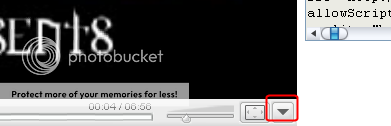
Using the sources.
You may use part 1 or 2, they both get the job done.
~~~~~~~~~~~~~~~~~~~~~~
Part: 1
There is a link on the page that says Embed on the right side towards then center, you click that to bring up the embed box(if it's not already up).
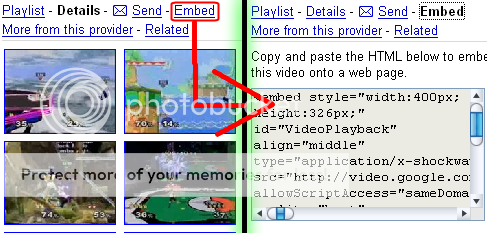
Copy the contents of that box and you end up with something like this.
exclaim (I suggest you open up notepad or wordpad)
<embed style="width:400px; height:326px;" id="VideoPlayback"
align="middle" type="application/x-shockwave-flash"
src="http://video.google.com/googleplayer.swf?videoUrl=http%3
A%2F%2Fvp.video.google.com%2Fvideodownload%3Fversion%3D0%26secu
reurl%3DtwAAAG7ggqAHSiJjpW0D3w4aYTVW13b2S_dIT8sWyUpEH3gc1BKEZ
rkN7pjB9lHzAJ5YXxhF4TcztgcRK6IWMCWY16x1AdIQgTCw7mM9R1P4lxc1Zk4
Pbu-vTQdAn0k0NXWB6zN12RifFnE9SJEvOsDfFegetEkTCoiwvgwfLR7nBokdsv8
VNerj1CXZpnbD1gFQP_iChA_1RvyMexpvVbq7tsyL4Cz6cOAMaboV6SqeyqL3A
NzLsXNFb1IBb68nHH6s9g%26sigh%3DcD7ZidesORhuAK1GclQ0t8fla0w%26be
gin%3D0%26len%3D416466%26docid%3D6909696159399073915&thumbnail
Url=http%3A%2F%2Fvideo.google.com%2FThumbnailServer%3Fapp%3Dvss%
26contentid%3D858f8d96a67775bd%26second%3D5%26itag%3Dw320%26url
created%3D1148796416%26sigh%3DsEmxumQStgMLv2HAZIEh305f-_s&playerId=
6909696159399073915" [removed]="sameDomain" quality="best" bgcolor="#ffffff" scale="noScale" wmode="window" salign="TL" FlashVars="playerMode=embedded"> </embed>
What you need to do is remove everything up to the first
http://, and remove
&thumbnailUrl= and everything after.
then you are left with
http://video.google.com/googleplayer.swf?videoUrl=http%3
A%2F%2Fvp.video.google.com%2Fvideodownload%3Fversion%3D0%26secu
reurl%3DtwAAAG7ggqAHSiJjpW0D3w4aYTVW13b2S_dIT8sWyUpEH3gc1BKEZ
rkN7pjB9lHzAJ5YXxhF4TcztgcRK6IWMCWY16x1AdIQgTCw7mM9R1P4lxc1Zk4
Pbu-vTQdAn0k0NXWB6zN12RifFnE9SJEvOsDfFegetEkTCoiwvgwfLR7nBokdsv8
VNerj1CXZpnbD1gFQP_iChA_1RvyMexpvVbq7tsyL4Cz6cOAMaboV6SqeyqL3A
NzLsXNFb1IBb68nHH6s9g%26sigh%3DcD7ZidesORhuAK1GclQ0t8fla0w%26be
gin%3D0%26len%3D416466%26docid%3D6909696159399073915
(if you want an autoplaying video, simply add
&autoPlay=true at the end of this horribly long url)
exclaim But wait! That's not usable as is right now! As you may have noticed... It's really long and the multimedia sections won't take it because of that.
So... You make it smaller! Go to a place like
http://tinyurl.com ,
http://snipurl.com/ .
Now enter the Long Url into the site, and make it shorter.
you should end up with something like this
http://tinyurl.com/kkdbm
Now paste it into your multimedia sections and you are set.
~~~~~~~~~~~~~~~~~~~~~~
Part: 2
This is pretty easy if you know what you are look for.. simply, you want you right-click the page, and view the source.
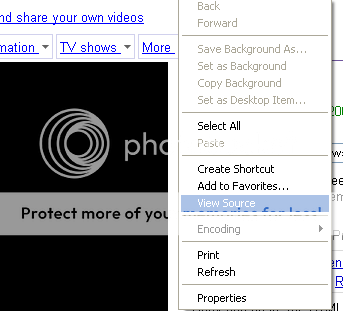
once you can see the page's source, what you want to do is press Ctrl+F to bring up the "Find" box.then you want to search for
swf?videoUrl and click find next (it should be the seecond one you find) and it should look something like this like this(varies from video to video).

Now, what you want to do, is copy everything starting at
http://video.google.com/... till
&thumbnailUrl=. Then you get up with something like this.
http://video.google.com/googleplayer.swf?videoUrl=http%3A%2F%2Fvp.vide
o.google.com%2Fvideodownload%3Fversion%3D0%26secureurl%
3DtwAAAG7ggqAHSiJjpW0D3w4aYTVW13b2S_dIT8sWyUpEH3gc1BKEZrk
N7pjB9lHzAJ5YXxhF4TcztgcRK6IWMCWY16x1AdIQgTCw7mM9R1P4lxc1Z
k4Pbu-vTQdAn0k0NXWB6zN12RifFnE9SJEvOsDfFejjov9EQ9-UfGMi7mc91Z
W7dq7CWKXxePoDzSYaLp4KhMwP0b446VU_A2xvQ2529Uq
VMNmX83Gtp8Og9HAnkEzinMkMUWAuguVoMym29Xg8UQ%26sigh%3DcZ
CBk4GY2ax3C89ypLqgAq2McSM%26begin%3D0%26len%3D416466%26d
ocid%3D6909696159399073915
Go to a place like
http://tinyurl.com ,
http://snipurl.com/ .
Now enter the Long Url into the site, and make it shorter. Then you are set.




 200
200
 50
50
 100
100