Lynz
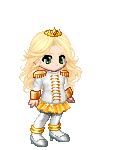




 Gracie Quest - Added to Gaia on May 14, 2007
 Click the Accept Quest Button.
 Make sure you watch it all, once it is completed the trailer view screen will display a prompt to Talk to Gracie.
  Click it.
 Click the Finish Quest button to receive your item.
 Tsubasa Ruffled Feathers Quest - Added to Gaia on May 09, 2007
 Read what he has to say, and then click the Accept Quest Button.
 So head over to the world map, go ahead and use the link he provided you and you should receive your first feather right away.
 . Click the feather when you see it.
  , and you'll get either a Large, Medium or Small feather. Follow the directions on screen.
  All you need to do once you return to the NPC is to click the Give Items Button.
 You did it! Click the Finish Quest Button.
  New User Quest - Added to Gaia on Nov 16, 2006
 Be sure to read everything Moria has to say to you now, and from this time forward. Mistakes can often times be avoided by just reading things carefully. When you have read the message, click the accept Quest Button.
  Easy enough right? ^_^ Just click the link in her message, and off you go. Make sure that you add an item, or remove an item and then save changes. If you do not make an actual change, Moria will stay on this step until you do.
  So now click the continue button to move to the next step in your quest.
 Pretty nifty huh? Cant say you didn't get something out of this, be sure to click the "Claim Reward & Continue" button. It will then redirect you to this screen,
  before bringing you to the next step.
 If you haven't used Daily chance yet, it will bring you to the main page, and all you got to do is click the Daily Chance, get your Daily Chance Prize, and Moria will bring you on back. If you have already used Daily Chance Moria will automatically redirect you back to the next step as soon as you click the "Accept Quest" Button.
  If you haven't used Daily Chance before, you will get basically the same message, but worded a bit differently. In either case click the "Claim Reward & Continue" Button, to get your small gold prize, prompting the redirect screen which leads you the next step.
 To start click the "Accept Quest" Button.
  and go to the Barton Boutique. Once you arrive at the Barton Boutique
  make sure to first (i) Click the dialog bubbles to make them disappear (ii) Click the By Price tab, which is the bottom tab in the store item viewing area. Okay, now that everything is sorted by price, pick a cheap item you like, and buy it. Once you purchase the item Moria will appear
  , click the "Continue" Button.
 That's pretty sweet! Click the "Claim Reward & Continue" button, which will prompt the redirect screen,
  and lead to the next step.
 Easy enough, so just click the "Accept Quest" button, and as Moria asked, then click on the pic of your avatar located in the upper right corner of your screen. This will take you to your Inventory List Screen. Click the Customize Me option next to your avatar, to go to your Customize Avatar page. Once there, find your new item in your Equippable Items window, add it, and be sure to Save the Changes. Be sure to actually make a change to your avatar's outfit before saving, otherwise the step will keep repeating till you do it correctly. Once completed Moria will pop-up with a new message
  . So click the "Continue" Button.
 This time it's a piece of Flame Clothing. Click the "Claim Reward & Continue" button, which will give you the redirect once again.
 So to get started click the "Accept Quest" button, which will bring you to this message from Moria with a link.
  Click the link to go directly to the forum. But don't make a new thread, use the existing thread I have shown in this screen cap.
  Make your post and viola, that's another step done. Moria appears
  , be sure to click the "Continue" button.
 Click the "Finish Quest" button, to finish and get your gold.
 You can click the link, provided by Moria, to return to the homepage now, and continue enjoying all that Gaia has to offer. You can also, if you like head back to the Quests Section, by using the scroll icon in the upper right corner, and see that the New User Quest is added to you completed quests section.
 The Last Mimzy Quest - Added to Gaia on March 08, 2007


 before it brings you back to the Last Mimzy Guild. You can join up and post if you like. It's not a requirement of the quest. Your all done. Just click the Quest button to head back to the quest section and see that the Mimzy Quest has been added to your completed quests section.
 New User Quest
 The Last Mimzy Quest Tsubasa Ruffled Feathers Quest Gracie Quest

 Mimzy
Mimzy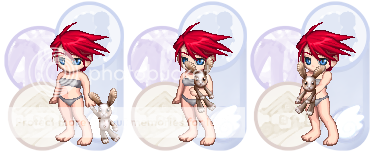
 Mokona Hat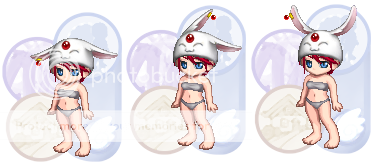
 Gracie's Soccor Ball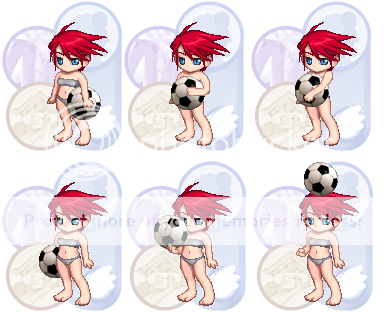

© Copyright 2003 - 2025 Gaia Interactive, Inc. All Rights Reserved. | Page generated in 0.403 seconds | Time drift: 0s | Server IP: 10.21.23.165