Dextromethorphan PhD
(?)Community Member

Offline
- Posted: Tue, 15 Feb 2005 09:47:05 +0000
<center>Navigation</center>
1. Hangouts Guide
2. Screenshots
3. Glitches
4. Issues
5. FAQ
6. Extra Features
<center>Updates</center>
My status: Looking for bugs and more new features ^^; Also, there will be more features added on to the hangout system. So Stay tunes for updates ^^
I am online please pm me with any new updates, features or glitches on hangouts so i can add them the this FAQ ^^
Also, Mods have permission to update this post as they please.
<center>1. Hangouts Guide </center>
1. go to edit profile and click yes to hangouts ^^
2. to request to hangout, go to the user you want to hang out's profile and click 'click here to request to hang out.
3. to accept another person's request, go to your profile and click the hangouts to deny or accepy hangouts ^^
That's all i got so far ^^ i'll add more later!
First documented hangout: Lividie and Modern Rxmance
Sendbox Tutorial-

1. Click this to kiss the other user.
2. Click this to send a Instant Message to the other user.
3. Click this to hug the other user. ^^
<center>2. Screenshots ^^</center>
1. IM feature ^^
2. Hugs!
3. Kisses!
4. Hanging out with youself ^^ blaugh
5. Examples of difference between intimate and friendly.
Intimate-
friendly-
<center> 3. Glitches related to Hangouts</center>
1.
2. Hangouts causing problems with Random Events? (only speculation, if you can prove this wrong, please pm me with a screenshot of this being proved right of wrong) - (You can see random events with hangouts active ^^)
3. Not being able to request hangouts with friends only accepting friends. - Solution = For it to properly work, they will actually have to go into their profile and save it if they have not done so since this new feature has been released.
4.
5.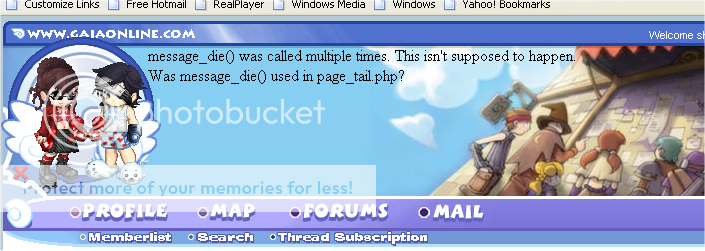
Uhhh..new glitch? eek I remember the die message. The servers encourage suicide. xd
eek Message_die?!! It's returned? gonk stressed crying
6.
7.
o.o - new glitchy?
8.

i have two shoes on the foot on the left. eek
has anyone pointed this little glitch out? it seems that the hangout feature is put over your avatar and it's a little off. Don't pay any mind. Just a imperfection ^^
9.
10.
4. Issues
Some how I figure the admins are aware of this as being a possibility, so I doubt it will be taken away as its private and the same as people abusing the PMs for it, rather hard to catch I suspect.
and one thing about the system I found out already:
Trying to "Hangout" is not recommended with more than one person... found out it glitches it all to hell and back, atleast for me, haha.
Good thinking, maybe since they are private they wont be taken away.
5. FAQ
1. There's a little x on the bottom left side of the hangout.
6. Extra Features
1.
Here is the code needed to make it ... just replace the word 'IMAGEURL' with the website url .. of the image of your choice smile
<img src="http://IMAGEURL">
(( as you will notice .. the image was too big for the window... and so a scroll bar appeared so you can scroll down and see the rest of the image)
1. Hangouts Guide
2. Screenshots
3. Glitches
4. Issues
5. FAQ
6. Extra Features
<center>Updates</center>
My status: Looking for bugs and more new features ^^; Also, there will be more features added on to the hangout system. So Stay tunes for updates ^^
I am online please pm me with any new updates, features or glitches on hangouts so i can add them the this FAQ ^^
Also, Mods have permission to update this post as they please.
Modern Rxmance
It seems as though everyone's ability to accept hangouts was changed back to 'friends only' even if they changed it before the www server failure.
VO
Dear Users,
In the spirit of Valentine's, we have just released GAIA Hangouts!
GAIA Hangouts is a way for users to virtually "hang out" with one another.
To start a hangout with someone, simply view their profile. Towards the bottom of their info, you'll see "Click here to request to hangout." Doing so will send a hangout request to that user.
To accept a hangout session, click on "My Hangouts" on your profile page. Once accepted, you will both appear in the header together and you'll be able to send quick messages to each other as well as send hugs or kisses.
Stay tuned as we will be adding some more stuff for hangouts as soon as they are ready.
Thanks for your support!
In the spirit of Valentine's, we have just released GAIA Hangouts!
GAIA Hangouts is a way for users to virtually "hang out" with one another.
To start a hangout with someone, simply view their profile. Towards the bottom of their info, you'll see "Click here to request to hangout." Doing so will send a hangout request to that user.
To accept a hangout session, click on "My Hangouts" on your profile page. Once accepted, you will both appear in the header together and you'll be able to send quick messages to each other as well as send hugs or kisses.
Stay tuned as we will be adding some more stuff for hangouts as soon as they are ready.
Thanks for your support!
<center>1. Hangouts Guide </center>
1. go to edit profile and click yes to hangouts ^^
2. to request to hangout, go to the user you want to hang out's profile and click 'click here to request to hang out.
3. to accept another person's request, go to your profile and click the hangouts to deny or accepy hangouts ^^
That's all i got so far ^^ i'll add more later!
First documented hangout: Lividie and Modern Rxmance
Sendbox Tutorial-
1. Click this to kiss the other user.
2. Click this to send a Instant Message to the other user.
3. Click this to hug the other user. ^^
<center>2. Screenshots ^^</center>
1. IM feature ^^
2. Hugs!
3. Kisses!
4. Hanging out with youself ^^ blaugh
5. Examples of difference between intimate and friendly.
Intimate-
friendly-
<center> 3. Glitches related to Hangouts</center>
1.
ChocoHearts
1) The Bug:
So I was hanging out with my friend in Opera, right? And I read the announcement that says you can move the store previews around and stuff, so I tried it (still in Opera)... with no luck. So I says to myself, "Self, you should try Firefox, to see if that works!" So I did: I loaded up Firefox, logged into my account, and noticed that my hangout panel-thing was not there on Firefox. I just thought that maybe it was cookie-based or something, and continued on my merry way to the store. (By the way, the draggable previews DO work in Firefox, just so you know. biggrin ) Content with my findings, I closed Firefox and came back to my Opera, which had been left sitting the whole time. And lo! My hangout panel-thing was gone here, too!
The funny thing is, I can still see the messages that my friend sends me, and can click the reply button to continue the conversation. But I can't send her hugs and kisses ( cry ). She is afk at the moment, but when she gets back, I will get her to close the hangout and we'll start a new one. [edit] She had to get offline without getting back on Gaia.... We'll mess with it a bit more tomorrow, I hope. [/edit] But I thought this was an interesting enough glitch to post, and, uh, yeah. It looks similar to the one that faerierain reported.
Also, and this is an uberminor thing, but there's a white box around the hangout windows in Opera:
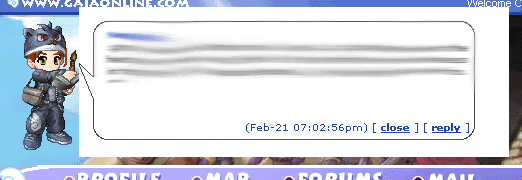
Not much of a problem, but it's worth mentioning.
2) Your Computer's Operating System:
Winders Ecks Pee Perfesh'nal. (Windows XP Pro, for those of you unaccustomed to Texan. blaugh )
3) Your Computer's Browser:
Opera and Firefox.
4) Your Computer's Internet Connection:
DSL
(Yeah, I pulled the form thing from the bugs forum sticky. But hey, at least I found this thread before posting this in a new topic, eh? whee )
So I was hanging out with my friend in Opera, right? And I read the announcement that says you can move the store previews around and stuff, so I tried it (still in Opera)... with no luck. So I says to myself, "Self, you should try Firefox, to see if that works!" So I did: I loaded up Firefox, logged into my account, and noticed that my hangout panel-thing was not there on Firefox. I just thought that maybe it was cookie-based or something, and continued on my merry way to the store. (By the way, the draggable previews DO work in Firefox, just so you know. biggrin ) Content with my findings, I closed Firefox and came back to my Opera, which had been left sitting the whole time. And lo! My hangout panel-thing was gone here, too!
The funny thing is, I can still see the messages that my friend sends me, and can click the reply button to continue the conversation. But I can't send her hugs and kisses ( cry ). She is afk at the moment, but when she gets back, I will get her to close the hangout and we'll start a new one. [edit] She had to get offline without getting back on Gaia.... We'll mess with it a bit more tomorrow, I hope. [/edit] But I thought this was an interesting enough glitch to post, and, uh, yeah. It looks similar to the one that faerierain reported.
Also, and this is an uberminor thing, but there's a white box around the hangout windows in Opera:
Not much of a problem, but it's worth mentioning.
2) Your Computer's Operating System:
Winders Ecks Pee Perfesh'nal. (Windows XP Pro, for those of you unaccustomed to Texan. blaugh )
3) Your Computer's Browser:
Opera and Firefox.
4) Your Computer's Internet Connection:
DSL
(Yeah, I pulled the form thing from the bugs forum sticky. But hey, at least I found this thread before posting this in a new topic, eh? whee )
2. Hangouts causing problems with Random Events? (only speculation, if you can prove this wrong, please pm me with a screenshot of this being proved right of wrong) - (You can see random events with hangouts active ^^)
3. Not being able to request hangouts with friends only accepting friends. - Solution = For it to properly work, they will actually have to go into their profile and save it if they have not done so since this new feature has been released.
4.
faerierain
I decided to test something smile
Html works on them ... but not bbcode
Here is a screenshot of the result of a image that was 'too big' for the window .... being sent with html code smile
Html works on them ... but not bbcode
Here is a screenshot of the result of a image that was 'too big' for the window .... being sent with html code smile
5.
SirhX
Ophiuchus
shewhomustnotbenamed1
Uhhh..new glitch? eek
eek Message_die?!! It's returned? gonk stressed crying
6.
faerierain
Ok I have a bug ..
I had a open 'hangout' ... and then someone asked for a new one.. I declined and it automatically closed my current 'hangout'.
Then ... my friend that I was 'hanging out with' ... sent me a message through her still open 'hang out' window...... and it came to me in the form of the window.... BUT she was removed from the picture.. so I only saw myself...... but I could still talk with her.
I had a open 'hangout' ... and then someone asked for a new one.. I declined and it automatically closed my current 'hangout'.
Then ... my friend that I was 'hanging out with' ... sent me a message through her still open 'hang out' window...... and it came to me in the form of the window.... BUT she was removed from the picture.. so I only saw myself...... but I could still talk with her.
7.
Tonks_Nymphadora
Quote:
unable to notify the user of the hangout.
o.o - new glitchy?
8.
Modern Rxmance
homestar_runna
i have two shoes on the foot on the left. eek
has anyone pointed this little glitch out?
9.
Virshatt
GLITCH:
This was mentioned on the first page, but not in detail...I was hanging out with a mule, and I closed the hangout on one side. Then, I went and closed it on the other side (without refreshing) and I got an entirely white screen with this on it:
message_die() was called multiple times. This isn't supposed to happen. Was message_die() used in page_tail.php?
This appeared on the screen with the second closeout...the first time I closed, I just got the "hangout closed" or whatever message.
This was mentioned on the first page, but not in detail...I was hanging out with a mule, and I closed the hangout on one side. Then, I went and closed it on the other side (without refreshing) and I got an entirely white screen with this on it:
message_die() was called multiple times. This isn't supposed to happen. Was message_die() used in page_tail.php?
This appeared on the screen with the second closeout...the first time I closed, I just got the "hangout closed" or whatever message.
10.
Virshatt
I've got another glitch:
I sent a H.O. invite to a friend of mine who was hanging out with somebody else. When she accepted my Hangout invite, she no longer got messages from him, but she still saw herself next to the other dude's avatar, when it was really me, and we were chatting back and forth.
As to multiple windows, I expect if you get a message, it'll show up on every window you refresh so long as you don't close the message in one of them.
I sent a H.O. invite to a friend of mine who was hanging out with somebody else. When she accepted my Hangout invite, she no longer got messages from him, but she still saw herself next to the other dude's avatar, when it was really me, and we were chatting back and forth.
As to multiple windows, I expect if you get a message, it'll show up on every window you refresh so long as you don't close the message in one of them.
4. Issues
Segeric
Arethic
Segeric
Watch this feature be taken away because of a bunch of cyber whores. sad
Some how I figure the admins are aware of this as being a possibility, so I doubt it will be taken away as its private and the same as people abusing the PMs for it, rather hard to catch I suspect.
and one thing about the system I found out already:
Trying to "Hangout" is not recommended with more than one person... found out it glitches it all to hell and back, atleast for me, haha.
Good thinking, maybe since they are private they wont be taken away.
5. FAQ
1.
Modern Rxmance
Mwa
How the hell do I end a hangout session?! I don't want to hang out with myself no more. gonk
6. Extra Features
1.
faerierain
smile
Here is a sample .. of what the 'hangout' looks like with a different colored text.
here is the code needed to make it ... just replace the word 'choose' with the color of your choice smile
<font color="choose"> Wheeeee.... </font>
Here is a sample .. of what the 'hangout' looks like with a different colored text.
here is the code needed to make it ... just replace the word 'choose' with the color of your choice smile
<font color="choose"> Wheeeee.... </font>
faerierain
Here is the code needed to make it ... just replace the word 'IMAGEURL' with the website url .. of the image of your choice smile
<img src="http://IMAGEURL">
(( as you will notice .. the image was too big for the window... and so a scroll bar appeared so you can scroll down and see the rest of the image)