
Welcome to Gaia! ::

qotchuaddicted [Billionaire Giveaway]

Back to Guilds

★GET RICH QUICK, TIPS & TRICKS HERE! ★JOIN NOW!★ 

Tags: Chat, Rally, Blog, Party, Everything 

Reply -----ONLINE GAMES
Mybrute: DemonSasukeDS' Laboratory Research Area

Quick Reply

Enter both words below, separated by a space:

Can't read the text? Click here

Submit

Information Broker Sai

Shadowy Gaian

5,050 Points
  • Full closet 200
  • Hygienic 200
  • Tycoon 200
PostPosted: Mon May 18, 2009 11:58 am


User Image

Hope my research helps you as much as it does me, if you get stuck don't hesitate to send me a private message for help! sweatdrop


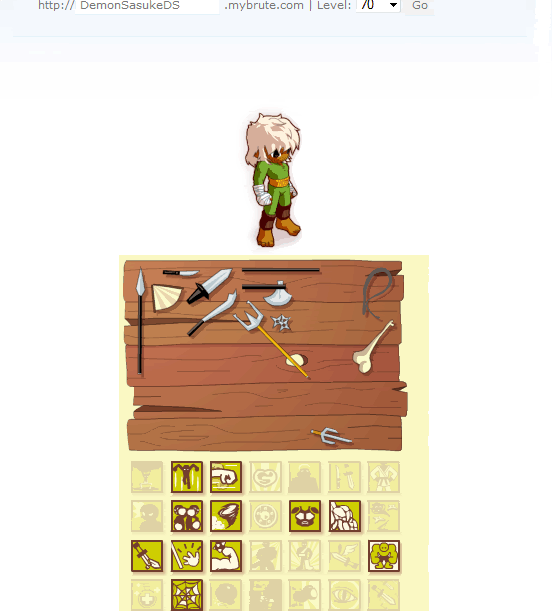
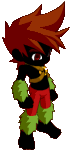
The Pitch Black Brute
User Image

Requirements:

  • You will have to make a new brute, you cant edit a brute that's already been made


How to unlock:
Step 1: Download and install Mozilla Firefox. If you already have this installed, then good for you

Step 2: Install Tamper Data Add-On to your Firefox. Follow the link and click Add to Firefox

Step 3: Now go to My Brute. Please pupil under DemonSasukeDS

Step 4: Type the desired name of the brute and select the appearance. DON’T click Validate!

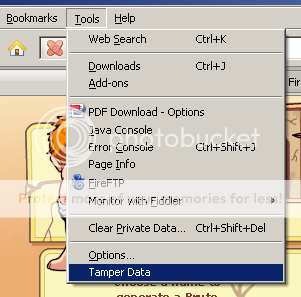
Step 5: In Firefox, select Tools, then click Tamper Data
User Image

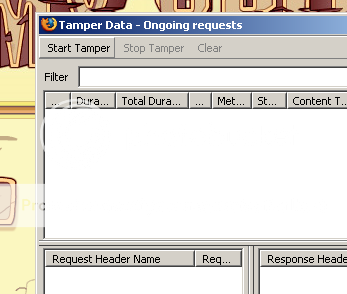
Step 6: In Tamper Data, click Start Tamper
User Image

Step 7: Now click Validate

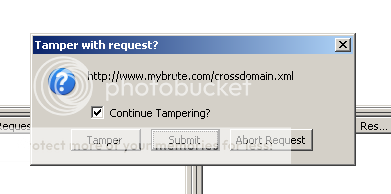
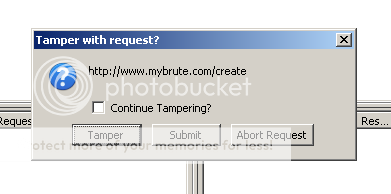
Step 8: A pop-up will appear.

a. For crossdomain.xml, just click Submit
User Image

b For create, uncheck “Continue Tampering?” check box and click Tamper
User Image

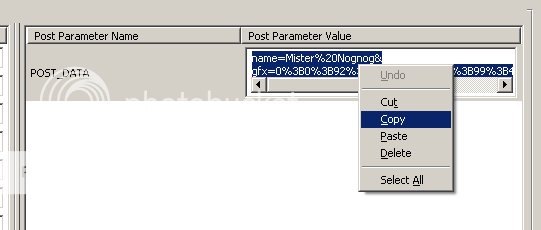
Step 9: The Tamper Popup will appear. Select all and copy the text inside POST_DATA.
User Image

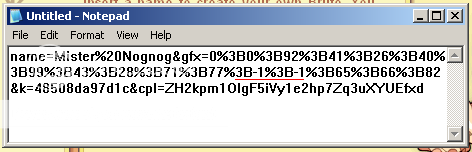
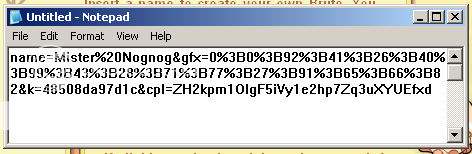
Step 10: Paste in Notepad

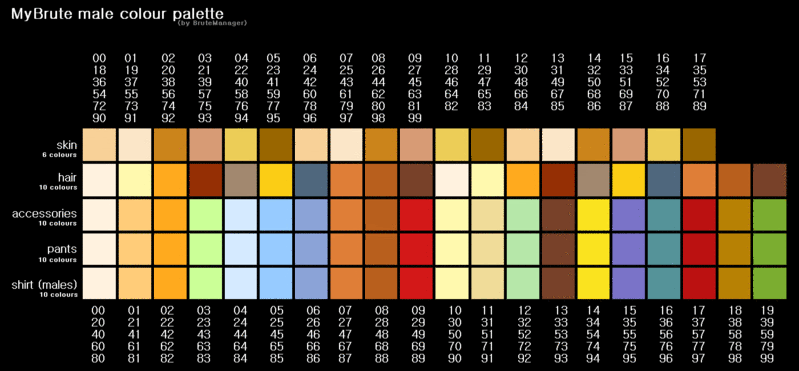
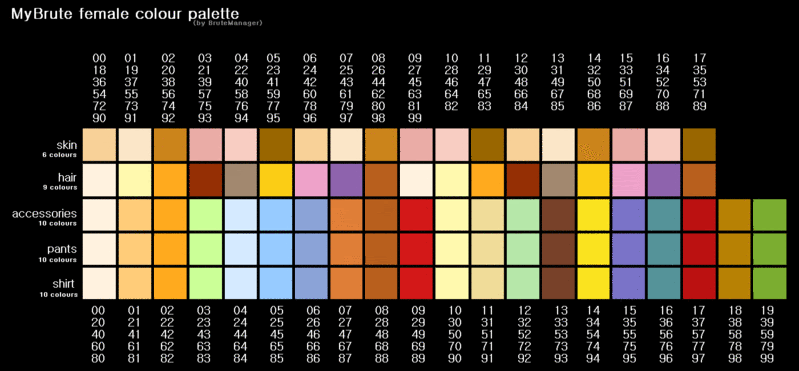
Step 11: Starting from the string “gfx=” going to the right, count until you reach the 12th % symbol. Change the value before the % to -1.

For example: Change 3B27% to 3B-1%

The number before the 8th is the Armor (changing this to 3B-1% will make your armor continuously morph into different armors)
The number before the 12th is the Skin color
The number before the 13th is the Hair color
The number before the 14th is the Accessories color
The number before the 15th is the Pants color
The number before the 16th is the Shirt color (for males)
User Image

User Image

Step 12: Copy the edited data string in Notepad and replace the POST_DATA value in the Tamper Popup Window

Step 13: Click Ok

Congratulations, you now have a black brute.
PostPosted: Mon May 18, 2009 2:07 pm


User Image

Apparently people have been spreading rumors that if you join under people who already have a bear or wolf. It greatly increases your chances of gaining one of those pets too?! lets explore this!


A Bear from MyBrute
User Image
A Wolf from MyBrute
User Image


The Urban Legend of getting pets:
Apparently joining by someone who already has a bear or wolf will give your own brute a 33% - 45% chance of getting your own bear or wolf.

My Own Personal Testings:
I did not get a new pet (and this was on quite a few numerous attempts).

Conclusion to failed research

so basically.. anyone trying to refer you to there brute saying you'll get a pet bear or wolf is just trying to recruit more pupils anyway possible.

Getting bears and Wolfs is purely by luck based on your characters creation, nothing will alter after you hit "validate" doesn't matter who your master is.

If you want to know if you got a bear or wolf, just use the brute planner which will be discussed on my next post.

Information Broker Sai

Shadowy Gaian

5,050 Points
  • Full closet 200
  • Hygienic 200
  • Tycoon 200

Information Broker Sai

Shadowy Gaian

5,050 Points
  • Full closet 200
  • Hygienic 200
  • Tycoon 200
PostPosted: Mon May 18, 2009 2:36 pm


User Image

Hey! This tells you what bonuses you'll unlock at any level you desire to know about... you could pick level 50 for example, and it will show you all the stuff you gained when you reach that level, including additional pets such as wolfs and bears.

Brute Planner
You know how some games or what not has a guide that lets you know what your going to get at each level you reach? Well something along those lines anyways.

Well... The brute planner apparently lets you do that. You type your brutes name, then put in any level you desire... Lets say level 1000, it will show you all the skills you would have obtained by then and pets e.t.c


My Own Personal Testings

User Image

Well, it tends to have that error problem from time to time (you know its quite similar to how MyBrute just randomly has errors and you need to refresh page).

But aside from that, after refreshing i found out my stats. I even did stats that i already passed just to see if it was randomly making up my stats, but it turns out it showed me all my stats i had in my previous levels.

3nodding Oh, there is a limit to how far you can check your levels. It goes all the way to level 1000. (I checked mine at level 1000, it turns out I'm going to get beastly in speed and agility.. but I'm not to surprised by my current attributes anyways)

Where is it? I want to see my personal Brute planner
Brute Leveling Planner

Additional stuff you can do on the brutetools website

  • In depth information on your brute
    Level:
    How much experience points left till next level:
    Total experience points gained so far:
    Number of students:
    Number of wins:
    The master of this brute:

  • Combat Simulator
    You can simulate a battle using your brute or any existing brutes name and even use unofficial levels on the brutes such as making them level 9999.
    (Note: try to remember the key word "Simulator" this is not some sort of cheat you can use to buff out your official brute)
PostPosted: Tue May 26, 2009 2:33 am


User Image
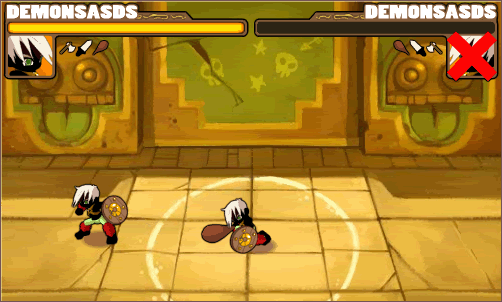
Ever heard the term "Your greatest enemy is yourself?" Meh... doesn't look like that applies for MyBrute


User Image

Why should i fight myself?
By fighting yourself, you are assured a 60% chance of getting 2 exp after the fight is over.

How can i fight myself
All you have to do is follow this simple code
http://[Insert brute name here].mybrute.com/vs/[Insert Brute name here]

for example:

http://demonsasukeds.mybrute.com/vs/demonsasukeds

Information Broker Sai

Shadowy Gaian

5,050 Points
  • Full closet 200
  • Hygienic 200
  • Tycoon 200

Information Broker Sai

Shadowy Gaian

5,050 Points
  • Full closet 200
  • Hygienic 200
  • Tycoon 200
PostPosted: Thu May 28, 2009 9:53 am


User Image
arrow confused Not another brute tool.....


Oh by the way... it really does help if you have a translator for these tools.

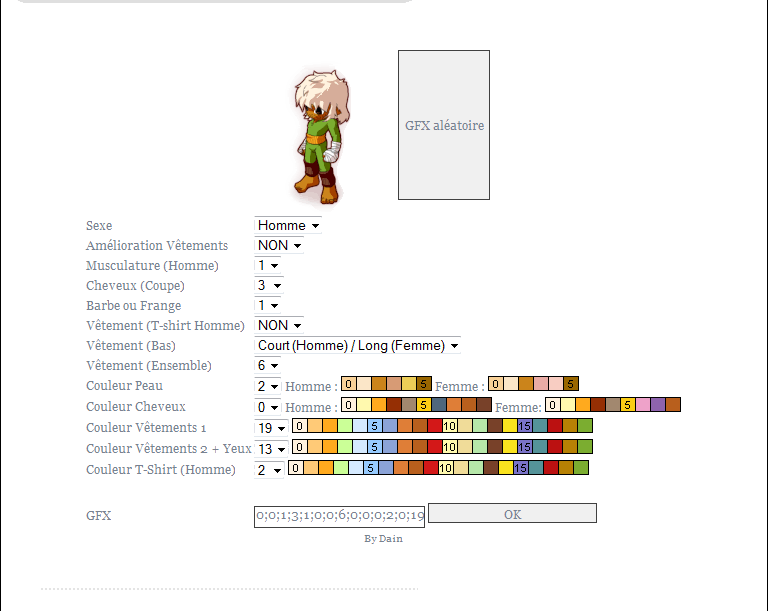
(Here is an example of the tool being used with my own brutes design)
User Image


Anyways... about the brute tool that i forgot to mention with the brute planner

You can dress up brutes with this tool.... nothing to special about that, but if you already know about tampering with the data to make black brutes. You may be able to use this tool to help you find the right colors for your brute whilst your tampering with it.

Link for the tool:
http://brutetools.netau.net/outils/GFX/gene-gfx.html

Additional palettes that may help you

User Image

User Image
PostPosted: Tue Jun 02, 2009 9:43 am


Wow, nice cheating (:

Ilumin

Fashionable Conversationalist

5,650 Points
  • Full closet 200
  • Conversationalist 100
  • Friendly 100
Reply
-----ONLINE GAMES

 
Manage Your Items
Other Stuff
Get GCash
Offers
Get Items
More Items
Where Everyone Hangs Out
Other Community Areas
Virtual Spaces
Fun Stuff
Gaia's Games
Mini-Games
Play with GCash
Play with Platinum