Welcome to Gaia! ::

Digital Media - | Photography | animation | graphics | web d

Back to Guilds


Reply _____Tutorials
[photoshop] Outlined Text Effect

Quick Reply

Enter both words below, separated by a space:

Can't read the text? Click here

Submit

RedRavenRuler

PostPosted: Sat Sep 22, 2007 10:15 pm


1.

Make a text layer. Then click off of it. Then click back on it.


2.

Select> Load Selection


3.

Select> Modify > Expand ( i usually use 2px)


4.

Make a new layer. Put it below your text layer. Then bucket fill in the selection with a different shade.

YAY YOUR DONE!!!

Heres what I made:
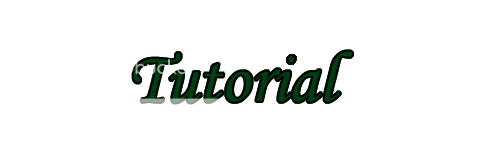
User Image
PostPosted: Tue Aug 11, 2009 10:18 pm


My turn to talk:
          Don't know if this is available in earlier versions, but anyway:

          Alternate method - Select the layer, apply a 'stroke' effect from the Layer FX menu. Modify the settings to get the width and colour you want.

          I'll edit this post and add screenshots when I get my main laptop fixed and have access to photoshop again.
... OK, go.

Glacial Apocalypse

Reply
_____Tutorials

 
Manage Your Items
Other Stuff
Get GCash
Offers
Get Items
More Items
Where Everyone Hangs Out
Other Community Areas
Virtual Spaces
Fun Stuff
Gaia's Games
Mini-Games
Play with GCash
Play with Platinum