|
|
|
|
|
|
|
|
|
 Posted: Mon Jul 13, 2009 10:54 am Posted: Mon Jul 13, 2009 10:54 am
 "'What is this', you ask?"
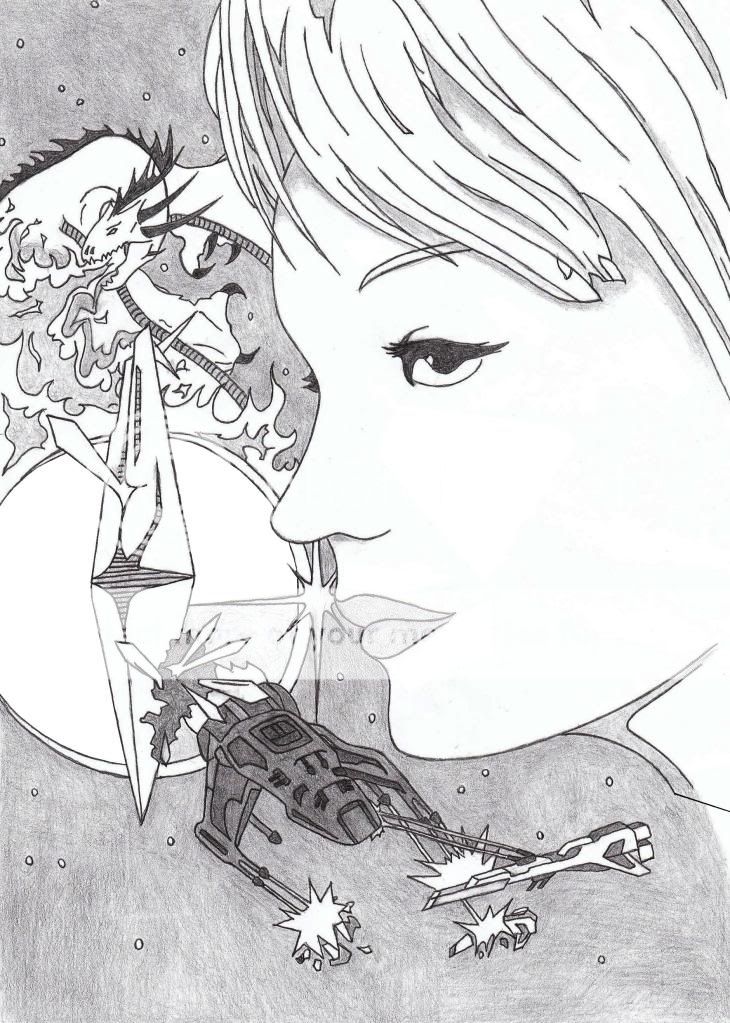
Okay, first and foremost, I use a free coloring program called 'Gimp'. Just google it and you'll (hopefully) get: Quote: GIMP - The GNU Image Manipulation ProgramThe GNU Image Manipulation Program, for X Windows systems. Sefira has volunteered one of her line arts for this, so be sure to thank her!
Everything I learned I got from tutorials on Youtube, but I get really frustrated with most of those: it's basically a video of them working, they don't actually tell you how they did it... and with those tiny screens, if they're not slow, you can't tell what they're doing without pausing every 5 seconds!
I don't know how to do videos... sweatdrop
So, I'll be posting screenshots. Hopefully that will be clearer.
Feel free to ask questions at any time.
"Why, it is an endless supply of Starbursts.
twisted Be afraid. Be Very Afraid."
|
 |
|
|
|
|
|
|
|
|
|
|
|
|
|
Posted: Mon Jul 13, 2009 11:04 am
|
|
|
|
|
|
|
|
|
|
|
|
|
Posted: Mon Jul 13, 2009 11:13 am
"'What is this', you ask?"
Holy CRAP!! That's amazing!!!!!!
eek eek eek eek eek
Is there anything special you want me to do, like a specific color for something? Like the spaceship?
"Why, it is an endless supply of Starbursts.
twisted Be afraid. Be Very Afraid."
|
|
|
|
|
|
|
|
|
|
|
|
|
|
|
Posted: Mon Jul 13, 2009 11:31 am
Well if you'd like guidance based on my own ideas.
The girl's hair is blonde. Her eyes are black. Her skin is pale and her lips can be anything from pink, to red, to violet I suspect. I never specified in my books, hehe.
The Dragon is white. His breath is a fiery red.
The planet is blue, maybe with atmospheric highlighting.
The dark (larger ship) Is black with red fire at its engines. Its lasers are respectively red. Cliche, eh? I know. (bad guys razz )
The other one is blue along the side and white along the top and the back. Its lasers are also blue. The pair of beacons in front of it are gray.
The debris of the ones getting blown up are blue/gray.
The crystal is white, but the shards growing out of it are green. The growth at the bottom of the crystal is black.
If you would like to follow these guidances, that'd be cool. But feel free to have fun and do whatever at the same time biggrin
I downloaded the GIMP program burning_eyes It will probably take me a week just to figure out the controls, lol. I will definitely have to come back here and see what you post so I can make better use of it
|
|
|
|
|
|
|
|
|
|
|
|
|
|
|
|
|
|
Posted: Mon Jul 13, 2009 11:35 am
|
|
|
|
|
|
|
|
|
|
Posted: Mon Jul 13, 2009 11:36 am
SefiraMoon Well if you'd like guidance based on my own ideas. The girl's hair is blonde. Her eyes are black. Her skin is pale and her lips can be anything from pink, to red, to violet I suspect. I never specified in my books, hehe. The Dragon is white. His breath is a fiery red. The planet is blue, maybe with atmospheric highlighting. The dark (larger ship) Is black with red fire at its engines. Its lasers are respectively red. Cliche, eh? I know. (bad guys razz ) The other one is blue along the side and white along the top and the back. Its lasers are also blue. The pair of beacons in front of it are gray. The debris of the ones getting blown up are blue/gray. The crystal is white, but the shards growing out of it are green. The growth at the bottom of the crystal is black. If you would like to follow these guidances, that'd be cool. But feel free to have fun and do whatever at the same time biggrin I downloaded the GIMP program burning_eyes It will probably take me a week just to figure out the controls, lol. I will definitely have to come back here and see what you post so I can make better use of it I don't know how to use everything on it, but what I do know looks good! ^.^
|
|
|
|
|
|
|
|
|
|
|
|
|
|
|
|
|
|
Posted: Mon Jul 13, 2009 12:14 pm
|
|
|
|
|
|
|
|
|
|
Posted: Mon Jul 13, 2009 12:27 pm
"'What is this', you ask?"
TAH-DAH! You can see Sefira's lovely line art again! HUZZAH!!!
Now, why did I ask you to do that?
Well, when you erase on Gimp without anything underneath:


bigger
Okay, real life calls, so brb!
"Why, it is an endless supply of Starbursts.
twisted Be afraid. Be Very Afraid."
|
|
|
|
|
|
|
|
|
|
|
|
|
|
|
|
|
|
Posted: Mon Jul 13, 2009 12:56 pm
"'What is this', you ask?"
-sneaks over as she's still doing dishes-
Make a new layer (see MY fourth post if you've forgotten... >.< I hope not...)
But instead of background, lets do her skin, okay?
Make sure it's on white before pressing 'Ok'.
DON'T DRAG IT DOWN! Instead:

bigger
More when I'm done with the dishes... Sefira, mind me asking what the character's name is?
"Why, it is an endless supply of Starbursts.
twisted Be afraid. Be Very Afraid."
|
|
|
|
|
|
|
|
|
|
|
|
|
|
|
Posted: Mon Jul 13, 2009 1:13 pm
heart Suicide Spicy Taco Ranger heart says...
Funny you should ask ninja Her name is Sefira!
|
|
|
|
|
|
|
|
|
|
|
|
|
|
|
|
|
|
Posted: Mon Jul 13, 2009 1:14 pm
"'What is this', you ask?"
AH HA!! That's great ^.^!
How's the coloring... advice (seems like just advice to me... xd ) helping?
"Why, it is an endless supply of Starbursts.
twisted Be afraid. Be Very Afraid."
|
|
|
|
|
|
|
|
|
|
|
|
|
|
|
Posted: Mon Jul 13, 2009 1:30 pm
So far so good. I can now layer and color. I'm sure you'll get to it, as I'm playing with all the tools right now, but how to fill in color without the selected color going all over the place... that's what I'm trying to figure out at the moment 3nodding
|
|
|
|
|
|
|
|
|
|
|
|
|
|
|
|
|
|
Posted: Mon Jul 13, 2009 1:35 pm
"'What is this', you ask?"
Yeah, I don't use the bucket... I mostly use the Paintbrush... >.< sweatdrop
"Why, it is an endless supply of Starbursts.
twisted Be afraid. Be Very Afraid."
|
|
|
|
|
|
|
|
|
|
|
|
|
|
|
Posted: Mon Jul 13, 2009 1:52 pm
"'What is this', you ask?"

Move around the scales and whatnot until you find a color you want, as a baseline. (Sefira, that pale enough for you? whee )

You might want the Bigger version on this one.. >.<
Anyway, more explanation:
Select the 'Paintbrush'. It probably has the Brush size on 11 and the Scale on 1.00. I upped the brush size to 19 (which is the highest it has on the circle brush) and the scale to 5.53 (Random number.)
The Brush size transfers to other tools that use a brush, but the Scale does not. If I were to chose the 'Pencil' tool, it would have the Brush size be 19 but the Scale would be back on 1.00. Make sense?
(Please say yes, but if it doesn't, I'll find a way to reword it...)

bigger
I know what you're thinking: "Poisyn aren't you old enough to know how to color in the lines?"
Well, if you want shading, you don't want to color in the lines. You'll be using the Blur tool later (I'll explain more then) and it'll ruin a lot of your hard work if you color in the lines.
Bottom line: There be a method to my madness!!! twisted
"Why, it is an endless supply of Starbursts.
twisted Be afraid. Be Very Afraid."
|
|
|
|
|
|
|
|
|
|
|
|
|
|
|
|
|
|
Posted: Mon Jul 13, 2009 2:22 pm
|
|
|
|
|
|
|
|
|
|
|
|
|