





You know the red bar in the corner on
your screen right? That is the rage
meter. Each slot tell you how much rage
you have. You obtain rage by attacking
the animated or by having them attack you.
The more hate aggro you accumulate the
more likely your to be attacked by the
animated.
-------------------------------------------------------------
--- More bang for your buck - RAGE ---
You may have noticed the red-bar in the lower right part of your screen.
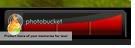
This is your RAGE meter, and you can use it to power-up
your rings effects. The rage meter fills up as you use your
rings, or as you get attacked. Every ring can be
activated at a higher level of rage by holding down the
button as you activate it - either the mouse button if
you're clicking, or the number button if you're using that method.
Just having the bar filled up doesn't do the trick,
you need to hold your button to USE that filled up bar.

See? The dark red is how much you have.
The lighter red is what it looks like when
you're actually USING rage.
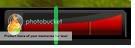
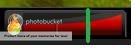
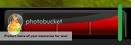
There's four rage levels. Rage Rank 1 is a ring that
has no rage in it - the 'default' so to speak. The
other rage ranks can be used by charging your
rings to the following positions.
Use that rage wisely, it can make your life a lot easier
adding Rage to a ring can increase it's area of effect,
add to it's damage, make it heal more, or even add
special buffs/debuffs that it didn't have at lower levels.
Experiment with rage, you won't regret it.
(As quoted from Nespin Fernagon in "the newbies
guide to zOMG")
