Welcome to Gaia! ::

[ B U R N :: the everything guild ]

Back to Guilds

The Everything Guild... For Everyone, Everywhere. Designed with you in mind, to help you make the very most out of your Gaia experience! 

Tags: charity, contests, reality, advice, gold 

Reply - Resource Database: For Gaia, the Internet, & Real Life -
☻ ~How to Sprite~ ☺

Quick Reply

Enter both words below, separated by a space:

Can't read the text? Click here

Submit

Was this Helpful?
  Yes! Sweet!
  Kind Of.
  Nope... (Reply the Why in thread)
View Results

WhiteWingtip

Unbeatable Phantom

8,200 Points
  • Ultimate Player 200
  • Tycoon 200
  • Conventioneer 300
PostPosted: Mon Nov 15, 2010 1:11 pm


☻~How To Sprite~☺


What is a 'sprite'?
In computer graphics, a sprite is a two-dimensional/three-dimensional image or animation that is integrated into a larger scene.
(Thank you Wikipedia)


What is 'spriting'?
Spriting is simple making, altering, or otherwise getting involved with sprites. Also known as "Pixel Art".

What is a 'spriter'?
Someone who "Sprites" (verb; to sprite).

Where is 'spriting' done?
Microsoft (MS) Paint usually.


Now this thread is not just for any type of spriting, but for pokemon spriting and trainer spriting.

User Image
This is a pokemon sprite.

There are many ways to manipulate this sprite.


This, for example, it a 'Recolor':
User Image

A recolor is simply that you... well... recolor the sprite using different colors.

Drawing a sprite from scratch is called, unoriginally, 'scratching'.
User Image
Like so.
Scratching does not use any parts from any other pokemon. That would be cheating. There are however, Mutations that occassionally use 'Scratch'.
*See Muk Chao


A mutation is when you take parts from one sprite, and move it on another sprite.
User Image

Now this doesn't look finished to me, what do you think?

Mutations are usually paired with Recolors like so:
User Image

Now doesn't that look fantastic? Yay!

Spriting using pokeballs and Chao's.


User Image

This is a pokeball.


User Image

This is a chao. Chao's usually have a little circle floating above their head.

Let's make a Ho-oh pokeball and a Muk Chao.

User Image
Well... it has all Ho-Oh's colors, but can you really tell it's Ho-oh's pokeball? No. So for pokeballs you need to mutate the pokeball to make it look like Ho-Oh's pokeball.
User Image
Ah, there, now you can see it.
Be careful not to go too over the top with pokeballs. It's very easy to get carried away.

Now, I'm going to explain what I did to get a chao to look like Muk. As seen below.

User Image
First off, notice they have matching colors. Good.
Then I put the arm up so it would mimick Muk. Good.
Then came the hard bit which was scratching the body so it looked like a little pool of... well... Muk. Good.
After that I had to make the expression somewhat match Muk's. Yay. Good.
Now the last thing I did was make sure the little circle above the Chao's head looked like it belonged to a Muk chao. Good.
And that's almost step by step how to make a chao. I may have missed something. It's been a while since I made that baby.


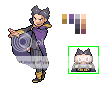
This can all be done with trainer sprites as well.
User ImageUser Image

Shading is also very important when creating sprites. This will come easier when you practice spriting more, undoubtedly.
Light usually comes from the top left in pokemon sprites and trainer sprites.

ALWAYS save your sprites as PNG format or else they will look all nasty and pixellated when you upload them.
User Image and User Image < are pixellated badly

PNG ensures the best quality when you upload.


Any Questions, comments, or help with Sprites? Post away!
PostPosted: Mon Nov 15, 2010 1:12 pm


Edit Post for more FAQ's.

WhiteWingtip

Unbeatable Phantom

8,200 Points
  • Ultimate Player 200
  • Tycoon 200
  • Conventioneer 300

Nerdodactyl

Duck

PostPosted: Wed Dec 01, 2010 7:30 pm


What did you use for making your sprites?
PostPosted: Wed Dec 01, 2010 7:34 pm


Nerdodactyl
What did you use for making your sprites?


The program I used was Microsoft Paint.
For the actual pokemon sprites, I used sprite sheets from the internet.

WhiteWingtip

Unbeatable Phantom

8,200 Points
  • Ultimate Player 200
  • Tycoon 200
  • Conventioneer 300

Nerdodactyl

Duck

PostPosted: Wed Dec 01, 2010 7:42 pm


WhiteWingtip
Nerdodactyl
What did you use for making your sprites?


The program I used was Microsoft Paint.
For the actual pokemon sprites, I used sprite sheets from the internet.

huh and do you do shading with paint or just solid colour, for recolours and mutations?
PostPosted: Wed Dec 01, 2010 7:46 pm


Nerdodactyl
WhiteWingtip
Nerdodactyl
What did you use for making your sprites?


The program I used was Microsoft Paint.
For the actual pokemon sprites, I used sprite sheets from the internet.

huh and do you do shading with paint or just solid colour, for recolours and mutations?


sometimes for mutations you need to "fix" shading, so you just use the colors you would for a recolor to make the shading look just right.

And yes always with paint because you should go pixel by pixel (or use the fill tool) when used in competitions like sprite contests.

WhiteWingtip

Unbeatable Phantom

8,200 Points
  • Ultimate Player 200
  • Tycoon 200
  • Conventioneer 300

Nerdodactyl

Duck

PostPosted: Thu Dec 02, 2010 6:22 am


WhiteWingtip
Nerdodactyl
WhiteWingtip
Nerdodactyl
What did you use for making your sprites?


The program I used was Microsoft Paint.
For the actual pokemon sprites, I used sprite sheets from the internet.

huh and do you do shading with paint or just solid colour, for recolours and mutations?


sometimes for mutations you need to "fix" shading, so you just use the colors you would for a recolor to make the shading look just right.

And yes always with paint because you should go pixel by pixel (or use the fill tool) when used in competitions like sprite contests.

okay thanks for answering my questions.
Reply
- Resource Database: For Gaia, the Internet, & Real Life -

 
Manage Your Items
Other Stuff
Get GCash
Offers
Get Items
More Items
Where Everyone Hangs Out
Other Community Areas
Virtual Spaces
Fun Stuff
Gaia's Games
Mini-Games
Play with GCash
Play with Platinum