|
|
|
|
|
|
|
 Posted: Mon Jun 05, 2006 4:08 pm Posted: Mon Jun 05, 2006 4:08 pm
Okay, yeah!
I wanted to do a tutorial, so I beat Notopu (who already has two done but not scanned. . . MWAHAHHA!)
This is a basic tutorial on how to clean up a pencil sketch with photoshop: Useful for appeasing angry mobs of fans that demand to know what your doing, or showing off rough drafts, etc etc etc. . .
|
 |
|
|
|
|
|
|
|
|
|
|
|
|
|
Posted: Mon Jun 05, 2006 4:23 pm
Okay, let's start with our start sketch: 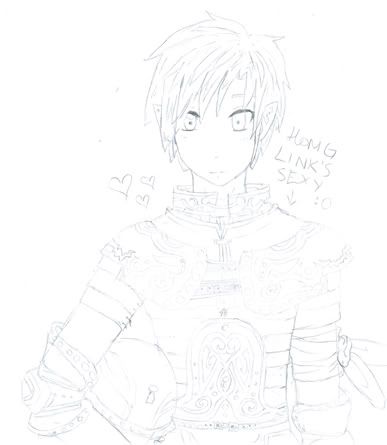 It's Linky! Ain't he cute!? Yeah, I used the first thing on my desktop. . . sweatdrop Note: This is also about 1/4 of the size I usually work in, I resized it for non-page-stretching purposes.
|
|
|
|
|
|
|
|
|
|
|
|
|
|
|
|
|
|
Posted: Mon Jun 05, 2006 4:29 pm
So, what was wrong with our start sketch? Well, for one, it's way too light: I can barely see it! So. . . We're gunna. . . KICK IT UP A NOTCH! . . . I've always wanted to say that. . .Seriously, though. We're going to mess with the levels now. 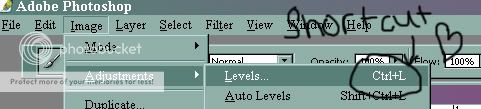 Go to the levels panel, like laaa. . . or just press Ctrl + L if you're lazy (like me)
|
|
|
|
|
|
|
|
|
|
|
|
|
|
|
Posted: Mon Jun 05, 2006 4:34 pm
This will open up our lovely levels panel. 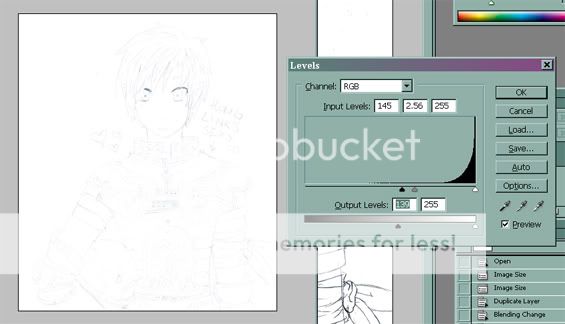 The most important thing here isn't to let the lines stand out: It's to make all the lines the same. This is the hardest part for me, since when I draw I tend to vary the pressure A LOT gonk Note: The levels you see are just for this pic: This is one of those parts where you have to eyeball it sweatdrop Every sketch is different, because every artist has different pressures when drawing.
|
|
|
|
|
|
|
|
|
|
|
|
|
|
|
|
|
|
Posted: Mon Jun 05, 2006 4:44 pm
Now here comes the really repetitive fun part! Duplicate your image like la 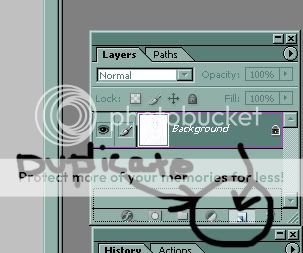 (click and drag) Then set the COPY to Multiply 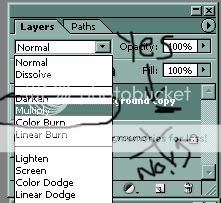 The Copy. NOT THE ORIGINAL gonk
|
|
|
|
|
|
|
|
|
|
|
|
|
|
|
Posted: Mon Jun 05, 2006 4:52 pm
Now it's time to duplicate like crazy, homie -G 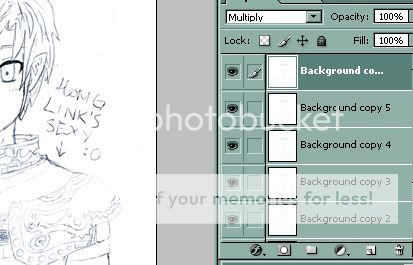 Basically, you're duplicating your duplicate until you have a darker image, meow. If that makes any sense at all. . . Note: Once again, this a play by eye sort of thing: an image can take anywhere between three and 3 bazillion duplicates, so use your personal judgement 3nodding
|
|
|
|
|
|
|
|
|
|
|
|
|
|
|
|
|
|
Posted: Mon Jun 05, 2006 4:57 pm
Now press Ctrl+shift+E And if your fingers are still straight, you should have merged all those copies with the original. WHEW! Now copy the original again.
|
|
|
|
|
|
|
|
|
|
|
|
|
|
|
Posted: Mon Jun 05, 2006 5:00 pm
This time we're going to mess with the threshold! Make SURE YOUR DUPLICATE LAYER IS SELECTED and go to here: 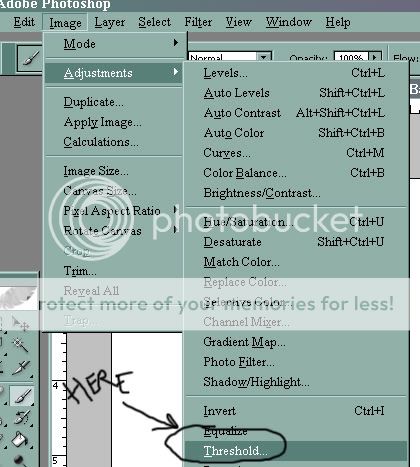 Sadly, there is no shortcut for this, meow sad Once at the threshold panel, mess about until the lines are all visible, with a minimum amount of static. 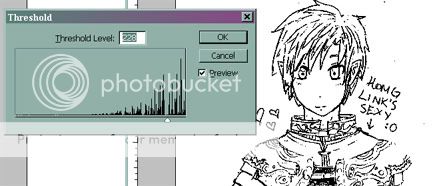 Once again, you've gotta play it as it goes, meow.
|
|
|
|
|
|
|
|
|
|
|
|
|
|
|
|
|
|
Posted: Mon Jun 05, 2006 5:15 pm
Now, we set the copy layer to Multiply: And fiddle with the opacity! Once again, it's one of those play it by eye things, I find the best opacity is between 5% and 25%, but it's really up to you, meow 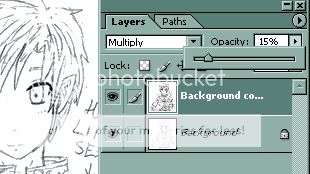
|
|
|
|
|
|
|
|
|
|
|
|
|
|
|
Posted: Mon Jun 05, 2006 5:21 pm
Now we press CTRL + Shift + E and merge down, Then duplicate again! This time, let's set this layer to "Screen" 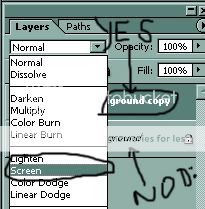 And adjust the opacity, as before, meow! 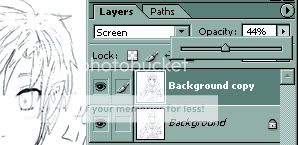
|
|
|
|
|
|
|
|
|
|
|
|
|
|
|
|
|
|
Posted: Mon Jun 05, 2006 5:23 pm
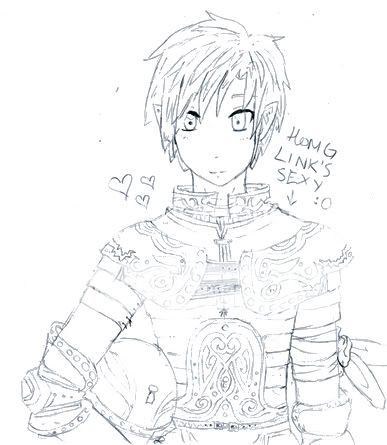 And here we have our finished product! It's not the best, the lines still have some sketchiness, but, in general, it's much more visible and the details are easier to see. I hope you found this tutorial enjoyable, meow!
|
|
|
|
|
|
|
|
|
|
|
|
|
|
|
Posted: Tue Jun 06, 2006 5:57 pm
crying I love you but... I wish I had adobe paintshop!!! -sulks away-
|
|
|
|
|
|
|
|
|
|
|
|
|
|
|
|
|
|
Posted: Fri Sep 22, 2006 6:30 pm
Kosakachi crying I love you but... I wish I had adobe paintshop!!! -sulks away- I'm going to try and get Photoshop CS from my school (since I'm in Dig. Phot.)
|
|
|
|
|
|
|
|
|
|
|
|
|
|
|
Posted: Sat Nov 11, 2006 11:08 am
That's so cool!
I wish I had photoshop tho...T crying T
|
|
|
|
|
|
|
|
|
|
|
|
|
|
|





 Reply
Reply