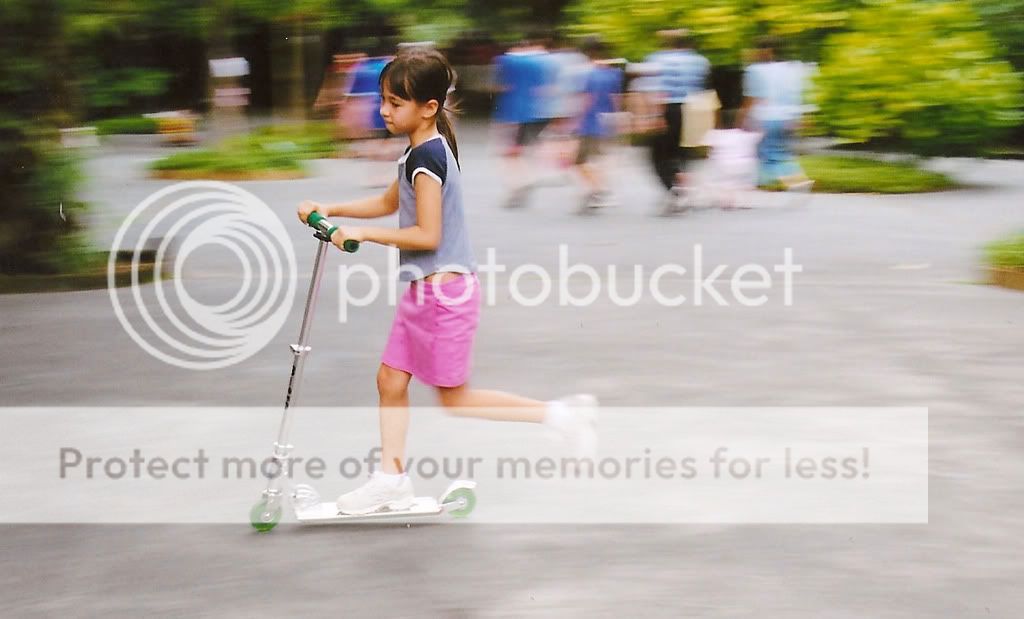


Words and Picture by Peter Bargh of ePHOTOzine
Whether it's your baby that's just learnt how to walk, a horse galloping along in a field or a car hurtling around a track - you can improve your chances of getting a sharp shot if you grasp a simple technique known as panning.
Try to photograph any moving subject without a little knowledge of shutter speeds and the chances are that you'll get disappointing results. They will either be blurred with an unrecognisable subject or the picture will be absent of the subject as it raced out of the frame when the shutter release was pressed?
These common problems in the world of action photography can be avoided if you follow our few simple tips.
All cameras adjust the amount of light reaching the film or CCD using shutter speed and aperture controls. The aperture adjust the amount of light entering the camera and the shutter speed controls the length of time the light is exposed to the film. It's the shutter speed we will use to perfect our panning technique.
The shutter speed is measured in fractions of seconds. A slow speed may be 1/15 second or slower and a fast speed is anything above 1/125 second. To take pictures of moving subjects you have several options. The most obvious is to select a fast shutter speed to freeze the subject. If the selected shutter speed is faster than the subject speed you're likely to stop it in its tracks, but that's a disadvantage. If you stop a moving car in its tracks it will look static and lack impact. A better technique is to select a slower speed and follow the subject as you take the photograph. This is panning.

Panning is a great technique for action and, once perfected, the main subject will be sharp against a blurred background. The idea is to follow the subject as it passes in front of you and continue to follow it as you press the shutter and even after the shot is taken.
If you pan at the same speed as the subject it will appear sharp against a streaking blurred background. To ensure smooth results keep your feet still and rotate the top half of your body as you track your subject. Prefocus your camera at a point where your subject will pass to ensure the picture is sharp. Also ensure the background isn't too light and doesn't have shapes as this can create ghostlike effects or streaks in the image. A darker background is better.
Get the shutter speed right - in this case about 1/15sec and the background will be blurred the wheels will be slightly blurred and the car will be sharp making it look like it's moving.A faster speed of 1/60sec was used here, I could have got away with a speed of around 1/8sec to 1/15sec but I wanted the spray to appear sharp.Use a shutter speed between 1/8sec and 1/125sec depending on the subject's speed and distance.
Make sure you press the shutter when the subject reaches a mid point along your panning track to ensure it's in the best position and try to follow without moving up or down to prevent subject blur.
Many automatic cameras have an override so you can manually set the shutter speed. If not, you may have to experiment with a neutral density (ND) filter to reduce the amount of light reaching the film. On a compact camera you could buy a sheet of ND lighting gel and cut this down to a small size to stick over the camera sensor.
Following a subject that's not in a straight line need Dexter care when panning. Here I had to follow in the arc made by the swing to ensure the subject was sharper than the background. A speed of 1/4 sec was used and creates a great sense of movement.If you use a digital camera that has an LCD finder and an optical finder, use the optical finder because the LCD may appear jerky when tracking at such speeds, making it difficult to follow the subject accurately.
Here are three example of things that can go wrong. Above left shows a static looking car caused by a shutter speed that was too fast. Above middle. Watch out for things that could get in the way on your panning track. Here a bush has blocked the view. Above right. Oh dear the digital camera LCD was used, this, user response and the slight shutter delay has missed the action.
Another technique to try is slow sync flash where you use a slow shutter speed and flash. The flash freezes the subject in motion as it fires and the long shutter speed ensures the background is blurred. Again the technique is to get the panning speed correct. Too slow and you'll see the bike trail too and merge into the background blur (left). Too fast and everything freezes (right). A good speed is about 1/8-1/15sec.